Download
Your studiois waiting.
KoraCut is available on macOS. The complete studio, with no account to create and nothing to pay. Windows and Linux follow.
64-bit
In developmentWindows
The Windows version already builds and runs its tests on every change. It is coming soon.
AppImage
In developmentLinux
The Linux version already builds and passes the same tests. It is coming soon.
Beta version for macOS · no account · GPL-3.0
Installation
Install KoraCut on your Mac, in one minute
Download finished? Follow the pictures. macOS blocks the file once, that is expected, and here is how to get past it.
Step 1 of 6 : Open the file, then click "Done"
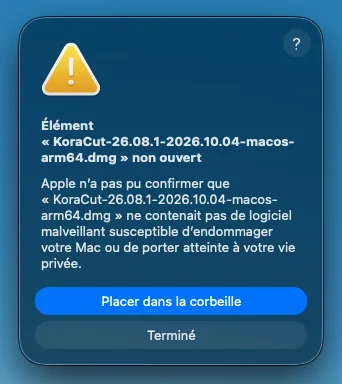
Step 1 / 6
Open the file, then click "Done"
macOS blocks KoraCut the first time, that is normal. Click "Done", never "Move to Trash".
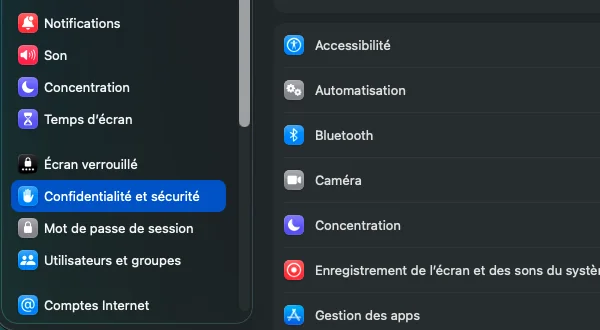
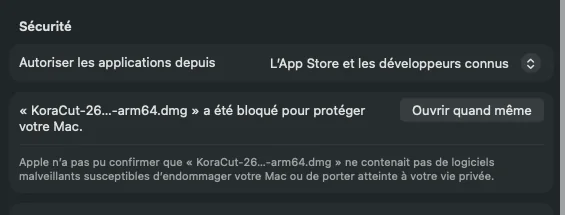
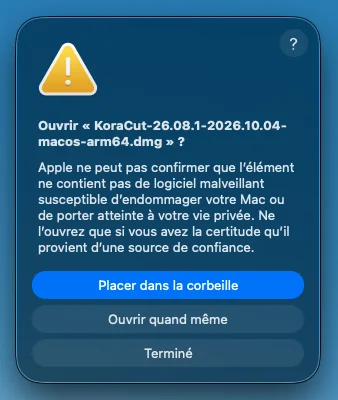
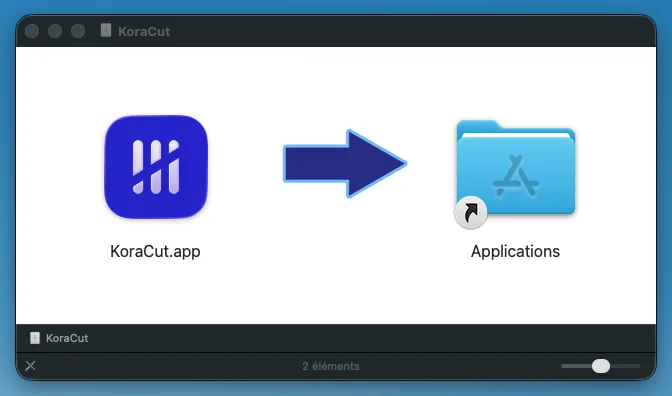
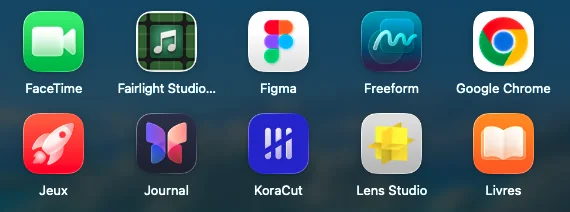
Arrow keys or a swipe to change step.
The screenshots come from a Mac set to French. The buttons sit in the same place on yours.
Comfortable with Terminal? One line.
Paste it in Terminal and press Return. It downloads KoraCut, checks the file and puts the app in Applications, without asking for your password.
curl -fsSL https://koracut.org/telechargements/installer-mac.sh | bashWhy these steps?
KoraCut does not have its Apple certificate yet ($99 a year). The file is safe, it only lacks that signature.
The coffees people buy pay for development, and for that certificate too. The day it is here, these steps go away.
A bug, some feedback on KoraCut? Report a bug or give your feedback.
The KoraCut agents are in development. Until then, you edit yourself, or you plug in your own. What is free, what is coming.
On your phone
A separate app, for later
KoraCut on a phone will not be a copy of the desktop app. It will be a separate app, designed for the touch screen and the battery: cut, reorder, add music and titles, output a vertical video, then send the project to your computer to finish it.
It is in development. It will come after the desktop version, and we do not announce dates we cannot keep. The newsletter tells you the day it ships.
Minimum requirements
- Minimum
- 4 cores, 8 GB of memory, 2 GB of disk
- Recommended
- 8 cores, 16 GB of memory, a GPU
The same app on all three systems
Same modules, same shortcuts, same project file. When the Windows and Linux versions ship, a project started on macOS will open as is on a PC.
Prefer to read the code or compile it yourself? The source code on GitHub (GPL v3).